

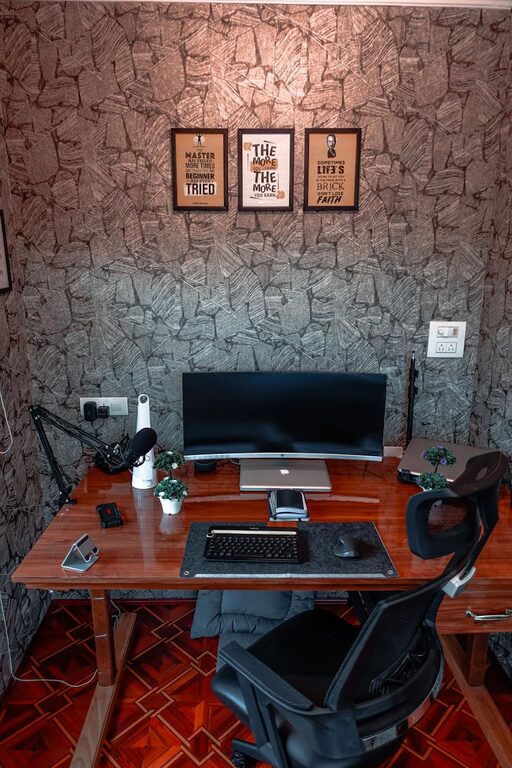
Creating a cozy and functional home workspace is essential for anyone who spends a significant amount of time working from home. A thoughtfully designed area not only enhances productivity but can also improve your overall well-being. Whether you have a dedicated room or just a corner in your living space, these practical tips will help you develop a workspace that feels inviting and supports your work needs.
Choosing the Right Location
Find a Quiet Spot
Selecting a quiet area is vital for focus and concentration. If possible, choose a space away from high-traffic zones in your home, such as near the kitchen or living room, where distractions are common.
Consider Natural Light
Natural light boosts mood and helps reduce eye strain. Position your desk near a window to take advantage of daylight. If that’s not possible, invest in good quality lighting that mimics natural light to keep the space bright.
Investing in Comfortable and Functional Furniture
Ergonomic Chair and Desk
Comfort is key to avoiding fatigue and discomfort. Choose an ergonomic chair that supports your posture and a desk at the correct height to prevent strain. Adjustable chairs and desks can be an excellent option to customize your setup.
Adequate Desk Space
Make sure your desk has enough surface area to hold your computer, notebooks, and other tools without feeling cluttered. This helps maintain organization and reduces stress.
Organizing Your Workspace
Use Storage Solutions
Organizers, shelves, and drawers can keep your desk tidy and your supplies within reach. Consider using filing cabinets or boxes to store paperwork and reduce clutter.
Keep Essential Items Handy
Place frequently used items, like pens, notepads, or a calendar, within easy access to avoid unnecessary interruptions.
Personalizing Your Space
Add Comfort Elements
Incorporate soft textures such as cushions, rugs, or a cozy blanket to make the workspace feel warm and inviting. These small touches can enhance your comfort during long work hours.
Decorate Mindfully
Use plants, artwork, or personal mementos to create a pleasant atmosphere. Plants, in particular, can improve air quality and add a touch of nature.
Minimizing Distractions
Establish Boundaries
If you share your home with others, communicate your work hours and boundaries. Using room dividers or noise-canceling headphones can help maintain a focused environment.
Manage Technology Wisely
Turn off notifications on non-essential devices and use apps that help block distracting websites during work hours.
Incorporating Technology and Tools
Reliable Internet Connection
A stable internet connection is fundamental for remote work. Position your workspace close to your router or consider using a Wi-Fi extender.
Essential Equipment
Invest in high-quality tools like a monitor, keyboard, or printer that suit your work requirements. Make sure cables are organized and safely tucked away.
Maintaining Good Habits
Take Breaks Regularly
Schedule short breaks to stretch and rest your eyes. This helps prevent burnout and keeps you refreshed throughout the day.
Keep Your Space Clean
At the end of each day, spend a few minutes tidying your workspace. A clean environment promotes clarity and readiness for the next day.
Final Thoughts
Designing a cozy and functional home workspace is about balancing comfort with productivity. By choosing the right location, investing in quality furniture, staying organized, and personalizing your area thoughtfully, you can create a space that supports your work and wellbeing. Remember, your workspace should inspire and energize you, making working from home a more enjoyable experience.